
Frequently Asked Questions
Find answers to your questions right here, and don’t hesitate to Contact us if you couldn’t find what you’re looking for.
printing questions.
What is CMYK?
CMYK stands for Cyan, Magenta, Yellow, and Key (Black) — the four ink colors used in professional printing. When combined in different amounts, these four colors create the full spectrum of colors you see in printed materials.
Why does it matter?
For the best print results, your files should be in CMYK color mode, not RGB (which is for screens). If your file is in RGB, the colors may look different when printed than they do on your screen.
What should I do?
When designing for print, set your color mode to CMYK in your design software. If you’re unsure, we can convert it for you, but there may be slight color shifts.
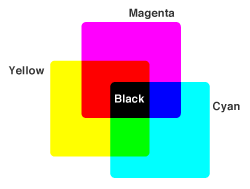
How important is it to convert my files to CMYK?
Very important! We only accept CMYK files for printing. If your files are in RGB (screen colors), the colors in your final printed product may look significantly different from what you see on your monitor — often duller or shifted.
What happens if I don’t convert?
RGB files can produce unexpected and disappointing color results when printed. To ensure your printed materials look exactly how you want them, always convert to CMYK before submitting your files.
Need help?
If you’re not sure how to convert your files, we can assist you — just reach out before placing your order.
What is a vector image?
A vector image is made up of lines and curves defined by mathematical formulas rather than pixels. This means it can be resized to any dimension — from a business card to a billboard — without ever losing quality or becoming blurry.
Why does it matter?
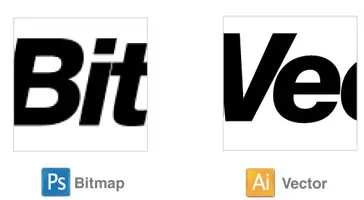
Unlike bitmapped images (like photos) that become pixelated when enlarged, vectors stay crisp and clear at any size. This makes them perfect for logos, icons, and graphics that need to work across different formats.
What we recommend:
Always provide vector files (like .AI, .EPS, or .SVG) for your logo and graphics whenever possible. This ensures the best print quality no matter what size we print.
What is resolution?
Resolution (measured in DPI – dots per inch, or PPI – pixels per inch) refers to how detailed your image is. The higher the number, the sharper and clearer your printed product will be.
What resolution do I need?
For print, we recommend 300 DPI for the best quality. Images at 150 DPI or lower will look blurry or pixelated when printed.
Quick tip:
If you’re pulling images from the web, they’re usually only 72 DPI — fine for screens, but too low for professional printing. Always use high-resolution images for the best results.
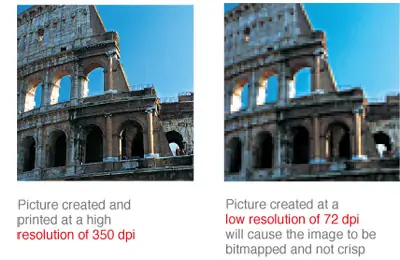
What is a bitmapped image?
What is a bitmapped image?
A bitmapped image (also called a raster image) is made up of tiny squares called pixels — like a digital mosaic. Photos and most images you see online are bitmaps.
Why does it matter?
Bitmaps look great at their original size, but they don’t resize well. When you zoom in or enlarge them, they become pixelated and jagged. When you shrink them, they can look blurry.
What’s the alternative?
Vector graphics (like logos created in programs like Illustrator) can be resized to any size without losing quality. That’s why we prefer vector files for things like logos whenever possible.
Bottom line: Use bitmaps for photos, but provide vector files for logos and graphics when you can.
What is a bleed?
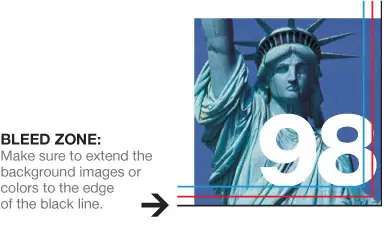
A bleed is the extra space around the edge of your design that extends beyond where the final product will be cut. Think of it as a safety margin that ensures your colors and images go all the way to the edge without any white borders showing up.
Why do we need it?
When we print and trim products like business cards or postcards, the cutting isn’t always perfectly precise. The bleed gives us wiggle room so your design looks perfect even if the cut is slightly off.
How much bleed do I need?
Most products need either 0.1″ or 0.125″ of bleed. Don’t worry about the technical details — just download the correct template for your product from our templates page, and the bleed will already be built in.
Can I have borders in my artwork?
Design Borders are not recommended due to cutting shifts. If your product is not trimmed exactly on the trimming line, borders may appear uneven. Especially for small products such as business cards, even half a millimeter of cutting shift may cause the borders to look uneven.